Getting prospects to answer your sales call is no easy feat. Research shows it takes an average of 12+ touches across channels to earn a response, yet many sellers give up after just a few attempts, rely on only one channel, or avoid the phone entirely.
When persistence drops and there’s no real value behind the outreach, the phone will always feel like it “doesn’t work.” In this session, we’ll share practical ways to build recognition over time, give prospects a reason to engage, and stay visible without being pushy, so when you call, it feels more like “Finally, we connect!” not, “Who the heck are you?!”
Watch Factor 8’s Lauren Bailey and a crew of sales pros who will share what it takes to get prospects to pick up the phone and engage.
In this session, we’ll cover:
How to warm up outreach across email, LinkedIn, and phone
How to use voicemail to build name recognition and credibility
What to say (and not say) when leaving a message
How repetition builds familiarity without being annoying
How to lead with value to build trust
How to feel more confident on the phone once prospects pick up
Bonus: 5 ways to build phone confidence with your team
Whether you’re prospecting into new accounts or following up with warm leads, you’ll leave with realistic ideas you can use immediately to stay persistent, stand out for the right reasons, and get more prospects to answer your calls.
WATCH RECORDING!
Tips to Get Prospects to Answer Your Calls
Getting prospects to answer your sales call is no easy feat. Research shows it takes an average of 12+ touches across channels to earn a response, yet many sellers give up after just a few attempts, rely on only one channel, or avoid the phone entirely.
When persistence drops and there’s no real value behind the outreach, the phone will always feel like it “doesn’t work.” In this session, we’ll share practical ways to build recognition over time, give prospects a reason to engage, and stay visible without being pushy, so when you call, it feels more like “Finally, we connect!” not, “Who the heck are you?!”
Watch Factor 8’s Lauren Bailey and a crew of sales pros who will share what it takes to get prospects to pick up the phone and engage.
In this session, we’ll cover:
How to warm up outreach across email, LinkedIn, and phone
How to use voicemail to build name recognition and credibility
What to say (and not say) when leaving a message
How repetition builds familiarity without being annoying
How to lead with value to build trust
How to feel more confident on the phone once prospects pick up
Bonus: 5 ways to build phone confidence with your team
Whether you’re prospecting into new accounts or following up with warm leads, you’ll leave with realistic ideas you can use immediately to stay persistent, stand out for the right reasons, and get more prospects to answer your calls.
Most sales call introductions fail because they sound exactly like sales call introductions.
You know the one. “Hi, my name is Lauren and I’m calling from XYZ Company, we’re the leading provider of blah blah blah…” The prospect checked out three seconds in. They’re scanning emails, mentally planning dinner, and looking for the fastest way off the phone.
That’s not a conversation. That’s a pitch disguised as a greeting. And it’s killing your pipeline.
After 20+ years of training Fortune 500 sales teams, I can tell you this: the reps who book the most meetings aren’t the ones with the best pitch. They’re the ones who get the prospect talking before they even realize they’ve taken a sales call.
Here’s how to use AI to craft a sales intro that’ll engage your prospects and get them talking.
First, Let’s Reframe What Selling Actually Is
Nobody wants to feel “salesy.” That word makes people cringe because of the stereotype: pushy, aggressive, slimy. A HubSpot poll found that only 3% of people trust salespeople. (Still just above politicians, so there’s that.)
But here’s what most people forget. Buying is fun. Think about the last thing you bought that made you genuinely happy. If buying feels great, then helping people get there should feel great too.
Selling is connecting one on one with another human to help them accomplish their goals. That’s the real definition. When you reach out to a prospect who’s stuck between “maybe” and “do nothing,” you’re not being pushy. You’re helping them get past the analysis paralysis. You’re making it easier to solve their problem.
Less than 10% of buyers will close themselves without any human help. That’s a lot of money left on the table because nobody picked up the phone.
I know. You’d rather just email or DM people on LinkedIn. It’s more comfortable. It feels less intrusive.
It’s also three times less effective.
The noise in inboxes is deafening. Even with AI-personalized outreach, written messages alone don’t cut it anymore. The most efficient sales prospecting strategy uses all channels: social, email, and phone. But if you want the biggest results, you have to call.
Here’s the math. If you carve out one hour a day to reach out to 20 leads by phone, you’ll talk to one or two of them. Do that five days a week and you’ll touch 100 leads, have 5 to 10 real conversations, and rack up more than 200 first-base conversations in a year.
How many do you have now?
Research from CEB shows that 53% of the time, buyers will choose the seller who was first to add value. Not just first to reach out. First to actually be useful. That’s the key. Being first without adding value doesn’t work. Volume plus value does.
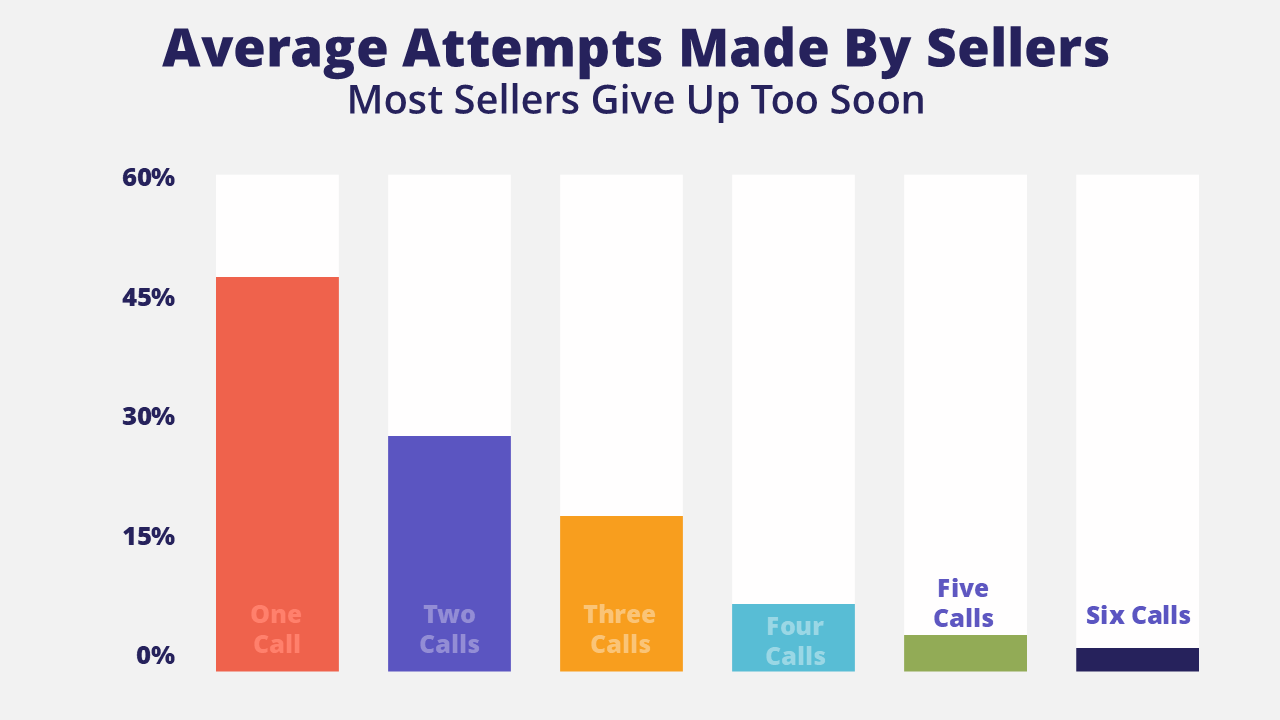
And here’s the thing most reps don’t realize: it takes 8 to 12 attempts to actually reach a decision maker. But nearly 50% of sellers give up after just one call. Less than 2% will make more than six. If you persist, you will be the first one to have a real conversation with that buyer. That’s a massive competitive advantage.
The Biggest Cold Call Introduction Mistakes Reps Make
Before we build a better intro, let’s talk about what’s broken. And let’s be clear: don’t be like every other rep who shows up and throws up. You know the ones.
Pickup and Pitch. “Hey, my name is Lauren and we’re the leading provider of this and that and I can da da da…” They just pitch. It’s pickup and pitch, and it gives sales a bad name. They didn’t pick up the phone to get pitched at. They picked up because they thought it was their kid’s school calling.
“Are you the person in charge of…?” I’ll lie to you to get out of having a sales call. This one screams sales call so loud that your prospect will say anything to end the conversation.
The Value Prop Intro. “Hi, this is Lauren. I’m calling with #GirlsClub, and we’re the premier community for women in revenue to get promoted faster.” Ugh. Shut up. I did not pick up the phone to hear your positioning statement. This is another very popular bad intro.
“Just calling to introduce myself.” Your mom might care. Nobody else does.
“Just calling to touch base.” Drum roll please. This is the most often used intro line in sales, and it’s horrible. Don’t touch my base. Don’t touch anything.
All of these fail for the same reason. They make the call about you. Your company. Your product. Your agenda. The prospect doesn’t care about any of that yet.
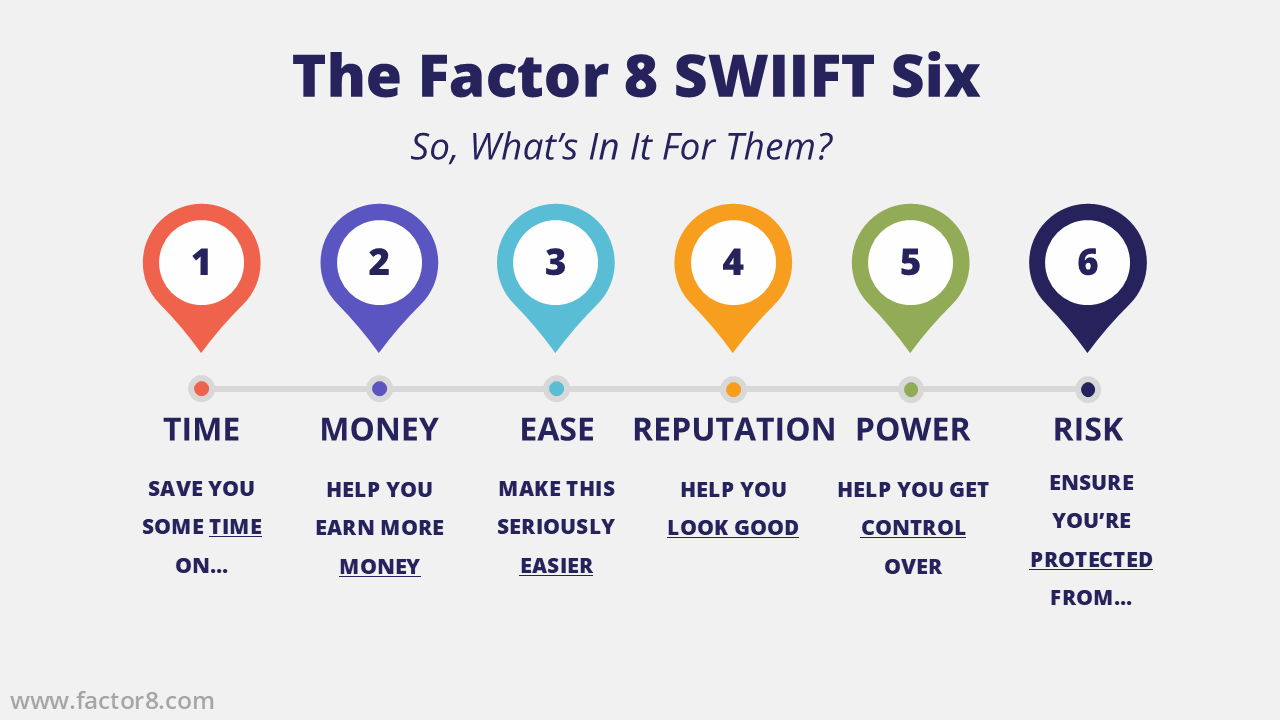
SWIIFT stands for “So, What’s In It For Them”. It’s a call introduction framework designed to capture attention, get the prospect talking, and start a conversation before they realize they’ve taken a sales call.
A good SWIIFT intro does three things:
It’s under 10 seconds
It answers three questions: Who are you? What do you want? Why should I care?
It ends with questions that get the decision maker talking fast
The goal of your introduction is not to pitch. It’s not to gain credibility. It’s not to check off items on your call sheet. The goal is to get them talking. Because the second they start answering questions, they stop doing email. They stop multitasking. Now you’re in a conversation, and you’re on first base.
Here’s the formula:
Their name (loud enough to be a pattern interrupt)
Your name and company (abbreviated, fast, they’ll ask again later)
One SWIIFT ear perk (a single value that makes them look up)
1 to 3 closed SWIIFT questions (easy to answer, gets them talking)
That’s it. No pitch. No product description. No “let me tell you about our award-winning platform.” Just enough to start a conversation.
The 6 Value Levers That Perk Up Attention (Plus One Bonus)
The ear perk is the secret sauce of the SWIIFT intro. It’s one short sentence that hits a value your prospect actually cares about. We call them the SWIIFT Six:
Time – “I’m calling to save you some time on…” Everyone’s busy. Time savings always land.
Money – “I’m calling to help you kick up the ROI on…” More revenue, less cost, better margins.
Ease – “I’m calling to make this a lot easier for you.” This is the hot button for working parents and overwhelmed managers.
Reputation – “I’m calling to make sure you’re the hero on this.” Looking good, being recognized, being the one who brought in the solution.
Power – “I’m calling to help you get control over…” Control and influence motivate more people than you’d think.
Risk – “I’m calling to pull all the risk out of…” Insurance, compliance, protection. If your product reduces exposure, lead with it.
And the bonus lever: a name. When someone hears “Mark in Legal asked me to give you a call,” they instantly give you credibility. Levers like referrals, mutual connections, or internal names are the most powerful ear perks you can use.
Pick one. Just one. Your instinct will be to cram your entire value prop into this sentence. Resist. When I teach this in workshops and ask people what they remember from each other’s intros, they always say the same thing: one word. “Risk.” “Easier.” “ROI.” That’s all they heard. Don’t overcomplicate it.
You can use AI to help pick the right lever. Ask ChatGPT or your AI tool of choice: “Which of these six business values would a VP of Sales care most about?” or “What does a working mom in operations value most?” Then build your ear perk around the answer.
Why Closed Questions Beat Open Questions at the Start of a Cold Call
Here’s where I’m going to go against what every sales training has ever taught you.
Most sales trainers say always ask open-ended questions. And in discovery calls, that’s great. But on a cold call introduction, open questions are a disaster.
Think about it. Your prospect wasn’t expecting your call. They’re busy. They accidentally picked up. And now a stranger is asking, “What’s keeping you up at night when it comes to hiring?” Their brain tries to process it, can’t come up with an answer fast enough, recognizes you’re a salesperson, and decides to get rid of you.
Instead, use closed questions. Yes or no. A number. One or two words.
There’s a scientific phenomenon called instinctive elaboration. When someone asks you a question, your brain stops what it’s doing and hunts for the answer whether you want it to or not. If I ask, “How old are you?” a number popped into your head just now. That means it’s halfway out of your mouth.
Closed questions exploit this. They’re fast, they’re easy, and they get the prospect talking before they’ve had time to put up a wall.
Compare these two:
Option A: “You’ve got over 50 sellers on your team these days, right?”
Option B: “How have you and your team managed to attack virtual onboarding ramp times given that they’re getting longer at most companies I work with now that work is remote?”
You stopped listening in the middle of B. So did your prospect. A is the winner, every time.
How to Tell If Your AI-Written Sales Intro Actually Works
Let’s put it all together. Here are two complete SWIIFT intros side by side. One works. One doesn’t. If you’re using AI to generate intros, this is how you evaluate what it gives you.
Option A: “LB here with Factor 8. I’m calling to see if I can help your team hit quota sooner. Are you primarily B2B there? Do you outbound or inbound? How many sellers under you?”
Option B: “LB here with Factor 8. We’re the leading provider of virtual sales skills for inside sales teams. We work with companies like yours to shorten new hire ramp. Is that interesting to you?”
A is the winner. Hands down.
A leads with one value (hitting quota sooner), then immediately gets the prospect talking with three fast, closed questions. B leads with a company pitch and ends with a question that’s basically asking the prospect to reject you.
“Is that interesting to you?” is an invitation to say no. “How many sellers under you?” is an invitation to have a conversation.
Now here’s what it looks like when you add a lever:
“Mark? LB here with Factor 8. Your VP of Sales asked me to give you a call and I promised him I would. Have you worked with David for a while now? Are you running inside sales or field sales for him? How many reps on your team?”
That’s three easy questions. By the time they answer the second one, you’re in a conversation and they’ve forgotten they accidentally picked up a sales call. That’s first base.
How to Use AI to Draft Sales Intros Without Sounding Like a Bot
AI is a fantastic tool for generating SWIIFT intros. But it’s a starting point, not the finish line.
Here’s how to use it well. Feed your AI tool these inputs:
Who you’re selling to (title, industry, persona)
What your product does in one sentence
Which of the SWIIFT Six values resonates most with your buyer
Your name and company name (abbreviated)
Then ask it to generate a SWIIFT intro under 10 seconds with one value-based ear perk and two to three closed questions.
What you’ll get back will be close. But you’ll need to do two things: cut it shorter (AI loves to be wordy) and make it sound like you. Read it out loud. If it sounds like a brochure, rewrite it. If it sounds like something you’d say to a friend’s colleague at a barbecue, you’re golden.
The best reps use AI to generate five or six variations, pick the best one, and then practice it until it feels natural. That’s the move.
Grade Your Intro Before You Dial
Before you pick up the phone, run your SWIIFT intro through this checklist:
Is it under 10 seconds?
Does it answer who you are, what you want, and why they should care?
Does it use a single value (not three stacked together)?
Does it end with 1 to 3 closed, easy-to-answer questions?
Would it perk your ear if you heard it?
Would you actually answer those questions?
If you can check every box, you’re ready. If not, shorten it, sharpen the value, and simplify the questions.
Get the Conversation, Not the Pitch
You can’t close more deals until you talk to more people. You can’t talk to more people if your intro sounds like every other sales call they’ve gotten this week.
Stop leading with your company name, your product features, or your credentials. Start leading with what’s in it for them. Be SWIIFT. Keep it under 10 seconds. Get them talking. And remember: the goal of the intro isn’t to sell anything. It’s to start a conversation.
Because nobody ever bought anything during a sales call introduction. But plenty of deals started with one.
Subscribe to our email list to receive new content, webinar invites, and training offers.
Prospecting might be uncomfortable, time-consuming, and frustrating, yet it’s still the single biggest driver of pipeline.
No prospecting means no conversations. No conversations means no meetings. No meetings mean no deals. And no deals means a very awkward forecast meeting.
What makes this even more painful is that most sellers are putting in the time. They’re just spending it in the wrong places.
Our data shows reps spend the majority of their prospecting effort on email, social (hello LinkedIn), and texting because it feels safer and easier. Less rejection. Fewer awkward moments. More boxes checked.
But when you look at the meetings that actually get booked and the deals that actually close, the story flips.
In other words, prospecting isn’t broken. The way most sellers are taught to do it is.
Prospecting isn’t about grinding longer hours, blasting more messages, or hoping something sticks. It’s about prepping smarter, planning your day, and knowing exactly what to say and why before you ever pick up the phone.
Why Prospecting Feels So Hard Right Now (And Why You Still Can’t Skip It)
Selling today is loud.
Buyer inboxes are flooded. Spam filters are smarter. LinkedIn DMs are packed with copy-and-paste messages. AI has made it easier than ever to send more outreach, which means buyers are spending more time ignoring it.
At the same time, buyers are busy. Internal meetings. Budget reviews. Tool fatigue. Decision fatigue. Even when interest exists, attention is scarce.
Sellers feel this every day. In our research, reps are not asking for more pressure or more meetings. They want tools that make their job easier and training that helps them say the right thing. Managers feel the strain too. Burnout is real.
So yes, prospecting feels harder than it used to.
But here’s the part that hasn’t changed. You still can’t skip it.
Prospecting is how pipeline starts. It is how conversations begin. It is how deals enter the funnel instead of magically appearing halfway through it. What has changed is that the old spray-and-pray approach does not survive in this environment.
More emails will not fix it. More automation will not fix it. And “just try harder” definitely will not fix it.
Modern prospecting requires intention. Knowing who you are calling, why you are calling them, and what you are trying to accomplish in that moment. Not jumping straight to a pitch. Not forcing a meeting ask before you have earned it.
The answer is not more activity. It is better preparation.
The Real Goal of Prospecting (And Why Most Sellers Get It Wrong)
Most sellers go into prospecting with one goal in mind. Book the meeting.
On the surface, that makes sense. Meetings lead to opportunities. Opportunities lead to deals. Deals make quota feel slightly less awful.
But this mindset is where prospecting starts to break down.
When sellers treat every call, email, or voicemail like it has to end in a meeting, messages get heavy fast. Value props show up too early. Case studies sneak into voicemails. Discovery questions get asked before a buyer has even agreed to talk. Outreach starts sounding like a pitch instead of an invitation.
It also makes rejection feel personal. When the goal is “get the meeting,” anything short of a yes feels like failure. That wears people down quickly, especially when most prospecting attempts will not convert on the first touch.
Here’s the shift.
The goal of prospecting is not to book the meeting. The goal is tostart the conversation.
You cannot get home if you cannot get on first.
Prospecting works when you break it into smaller, more realistic goals.
Get their attention
Get a response
Get them talking
Once someone replies, calls you back, or engages, you have earned the right to sell. Not before.
This is why shorter messages work better than longer ones. Why curiosity beats credibility early. And why sellers who focus on engagement instead of pitching consistently build more pipeline with less effort.
Prospecting is not about forcing an outcome. It is about opening the door.
Prospecting Emails, Voicemails, and Call Intros Are Not the Time to Sell
This is where a lot of sellers lose momentum before they ever get started.
Early outreach is not the place to pitch. It is not the place for your value prop, your customer logos, your case studies, or your discovery questions. When sellers try to sell too early, buyers do exactly what you would do. They scan, decide “no,” and move on.
The purpose of early outreach is simple.
Get noticed. Get a response. Start a conversation.
That is it.
When sellers treat prospecting like a mini sales presentation, messages get long, tone gets salesy, and response rates drop fast. Shorter, lighter, more human outreach consistently works better because it respects the buyer’s time and attention.
Think engagement first. Selling comes later.
Speed Wins. Shorter Messages Work Better.
One of the biggest prospecting myths is that more preparation always equals better results. In reality, over-preparing often slows sellers down and keeps them stuck in research mode instead of having real conversations.
Speed matters in prospecting.
Shorter messages are easier to listen to, read, and respond to. Buyers are far more likely to engage with something that feels quick and low effort than something that feels like homework.
This applies across every channel:
Short call intros beat long explanations
Short voicemails beat detailed messages
Short emails beat value prop dumps
Your job is not to explain everything. Your job is to earn the next step.
Phone Still Works. You Just Need Support from Other Channels.
Despite how uncomfortable it feels, the phone continues to outperform every other channel when it comes to booking meetings and closing deals.
That does not mean email, LinkedIn, or text are useless. They matter. They support the phone. They reinforce familiarity. They help warm things up.
But they work best when they are part of a plan, not the plan.
The strongest prospecting strategies use multiple channels together, with the phone leading the way and digital channels supporting it.
How to Prep Before You Ever Start Prospecting
Good prospecting starts before the first dial. The goal is not to research everything. It is to prepare just enough so you can move quickly and stay consistent.
When Should You Call
Timing matters more than most sellers think. You don’t need to guess or test endlessly. Patterns are pretty consistent.
Best days to call: Tuesday, Wednesday, and Thursday
Best times to call: 8–9am and 4–6pm (local time)
Reaching executives: Before 8:30am and after 5pm
Sneaky underrated window: Friday late afternoon
Calling at the right time doesn’t guarantee a conversation, but calling at the wrong time almost guarantees you won’t get one.
What You Need Ready Before You Call
A clear call goal
A short, practiced call intro
One rapport builder
A simple value hook
A voicemail plan if they do not answer
That is it.
You do not need pricing. You do not need a case study. You do not need their full job history.
Selling happens after the response, not before it.
Prospecting Is a Skill, Not a Personality Trait
Prospecting feels hard because most sellers were never taught how to do it well. They were taught to grind, push through rejection, and figure it out on their own.
There is a better way.
Prospecting works when sellers prep smarter, plan their day, and focus on conversations instead of outcomes. When done right, it takes less time, creates better engagement, and builds healthier pipeline.
Prospecting is not broken. It just needs to be done differently.
And when it is, everything downstream gets easier.
Subscribe to our email list to receive new content, webinar invites, and training offers.
If your reps are still using AI like it’s 2023 (or not using it at all), they’re already behind. In our Sales Shot, I sat down with four sales pros and AI enthusiasts whose teams are actually using AI for sales prospecting, not just talking about it. We’re talking AI-enhanced targeting and prospect research, coaching bots, live conversation sentiment tracking, even inbound AI voice agents that are outperforming humans (yes, really – so, will AI take over sales jobs? That’s a topic for another blog!)
Here’s what went down, and the best AI tools, tips, and prompts you’ll want to steal.
Smarter Targeting and Prospect Research
We kicked off with a game-changer: using AI to make sure you’re calling the right people. David Kreiger, SalesRoads, shared how his team usesClay to qualify leads before reps ever pick up the phone. It pulls company data and uses AI to tell you if a prospect actually fits your ICP, saves hours of manual research, and gets your team focused on the right accounts.
John Buckley (from Sell Better’s Daily Sales Show) showed usAgent.ai, a no-code agent that scores a company for outbound fit with a single URL. He’s trained it on his ICP so it gives a quick thumbs-up or “hard pass.” No prompt writing needed.
Jax Gill (from Inspira Financial) took it even further. She trains ChatGPT to review a company’s website and her prospect’s LinkedIn profile, then find common ground to help her build rapport fast. She even gives it a list of her solutions and asks for possible pain points to reference in the convo. It’s like AI-powered pre-call prep, minus the rabbit holes.
Prompt ideas to steal:
“Here’s my ICP. Here’s this company’s website. Is this a fit or not? Why?”
“Compare my LinkedIn profile to [prospect’s name]’s. What do we have in common?”
“Given this company and our services, what pain points can I lead with?”
Better AI Sales Prospecting Emails and Messaging
Let’s talk outbound emails. Doug Gibb’steam at Waste ManagementusesConquer with GenAI email, which drafts emails based on past conversations and makes sure they don’t miss a promised follow-up. It pulls call and email history straight into Salesforce, so everything’s in one place.
David dropped this gem: if you write more than three emails a week, build a custom GPT. He’s trained his to match his tone and voice. Upload 50 of your best emails, and now your GPT can write in your style. It’s faster, but more importantly, it’s better.
James added Oliv to the mix. This tool sends him a cheat sheet before every call with company background, team bios, and even icebreakers. “Ask Chloe about her transition from radio hosting to content marketing” is way better than “Hope you’re well.”
One big reminder from everyone: AI-generated emails shouldn’t sound AI-generated. If your message is filled with fluff, jargon, or emojis in every line, it’s going straight to trash. Your prospects can smell it. Use AI to help, but still bring your brain.
Prompt ideas to steal:
“Use my tone. Write a prospecting email for this company using the info from our last call.”
“Summarize this LinkedIn profile in one sentence I can use as a cold email opener.”
“Rewrite this message to sound more human, less like it came from a bot.”
Coaching, Confidence, and Call Reviews
AI isn’t just helping reps do the work. It’s helping them get better at it. David recommends using AI to coach yourself after calls. His reps drop their call transcripts into ChatGPT and ask for feedback. What could I have done better? What questions did I miss? It gives them a score and action steps to improve.
Jax uses AI before the call. She practices objections with ChatGPT in persona-mode. “Be a tough IT Director. Push back on cost.” It gives her reps a safe space to screw up and get better.
Doug’s team uses Conquer to transcribe and summarize every call. It flags sentiment dips, highlights next steps, and scores reps on their delivery. That all feeds into Ambition, where managers get a full coaching report before every one-on-one. And yes, even new managers can coach like pros because the system shows them exactly what to focus on.
We also shouted out Grw AI, a tool for roleplay call coaching. Reps can practice calls and get feedback based on real frameworks. It’s like flight simulator training for sellers.
I also shared how much I love using Fathomfor call notes. I just click a button and boom, it gives me a clean sales summary with top pain points, current situation, and next steps. It’s fast, easy, and way more useful than generic transcripts. Use it for internal calls too to help you take notes and create to-dos.
Prompt ideas to steal:
“You’re a skeptical IT Director. Let’s roleplay a cold call. Push back on price and security.”
“Here’s my call transcript. What could I have done better? Give me a grade.”
“Give me 3 coaching questions to reflect on after this call.”
Real-Time Insights and In-the-Moment Support
Sales moves fast. Reps don’t have time to dig through notes or scroll LinkedIn for the latest news. That’s where real-time insights come in.
James’s tip: Use LinkedIn Sales Navigator alerts. Ring the bell on your top prospects and accounts. You’ll get notified when they change jobs, get promoted, or post. Instant reason to reach out. That’s prospecting fuel your team is probably ignoring.
Doug’s team uses Ambition’s pre-read feature to prep for coaching. It pulls 90 days of call scores, KPIs, pipeline data, and even sentiment analysis so managers walk into meetings ready. Their AI-based pipeline insights show if deals are stuck, what changed, and where to focus.
David shared Trellus, a power dialer that lets reps pause mid-call to get AI-powered coaching suggestions. It’s like having a manager in your ear without the pressure.
Prompt ideas to steal:
“Give me coaching advice based on this sales call recording.”
“Summarize this opportunity pipeline for my one-on-one. What’s stuck and why?”
“If my rep is below target on discovery, what should I review with them this week?”
AI for Inbound, Enablement, and Emotional Intelligence
You didn’t think AI was just for outbound, did you? David’s team is usingSelafor inbound calls, and it’s outperforming human reps in tier-one qualification. The AI calls the lead, asks 2–3 qualifying questions, and routes the hot ones straight to an SDR. It’s efficient, repeatable, and for simple calls, often better than a live person.
James brought up Sybill, which reads facial expressions and body language during video calls. It sends post-call insights like, “Your buyer leaned back and widened their eyes when you said pricing.” That’s gold for follow-up and helps reps refine their messaging and emotional timing.
And of course, Doug’s team uses Microsoft Copilot, a company-approved, closed AI system integrated into their workflows. Their AI governance committee ensures compliance, which matters when your team is 50,000 strong.
Bonus tip from Jax: Use ChatGPT as your personal hype woman. “Give me a pre-call pep talk.” Or ask it to roast you. Either way, you’re showing up more confident.
Prompt ideas to steal:
“Pretend you’re my mentor. Give me a 30-second pep talk before this big sales call.”
“Roast me. What could I do better in my outbound pitch?”
“Act like a buyer. Ask me 3 tough qualifying questions based on this service.”
This session wasn’t fluff. These are real leaders, using real tools, getting real results. If your team is still scared of AI or waiting for some “perfect system,” you’re already behind.
The final takeaway?
“Use the time AI saves you to do the task better. Not faster. Better.” – David Kreiger
TL;DR – Here are the best AI sales tools and how our panelists are using them:
Agent.ai– James built an agent that scores companies instantly based on ICP fit, eliminating the need for prompt engineering
Ambition– Doug uses it to prep managers for coaching with pre-read insights that include sentiment, pipeline data, and call scores
ChatGPT – Jax shared how her team uses ChatGPT to simulate prospect objections and refine messaging before high-stakes calls; it’s like having a role-play coach on standby
Clay– David uses Clay to pre-qualify leads and filter out non-ICP accounts, saving reps hours of manual research
Conquer– Doug’s team uses it to auto-draft follow-ups based on call history and transcribe every conversation for coaching
Fathom – We use Fathom here at Factor 8 to summarize sales calls and uncover real buyer pain points. Tip: Use it for both internal and external meetings to quickly extract key details, create to-do lists, and skip manual note-taking
Grw AI– Lauren and Jax called it a flight simulator for sales; perfect for reps to practice and build confidence before high-stakes calls
Microsoft Copilot – James noted that Copilot helps his team save time by summarizing long email threads and prepping for meetings straight from Outlook and Teams
Oliv– James loves Oliv for the call prep emails, especially the personalized icebreakers like asking about career transitions
Sybill – Doug mentioned using Sybill to flag buyer reactions mid-call, helping reps spot hesitation or interest and follow up more strategically
Sela – David says Sela outperforms humans for tier-1 inbound lead qualification and is being used successfully in production
Trellus– David mentioned reps can pause a call and get live coaching advice based on the persona or objection they’re handling
Subscribe to our email list to receive new content, webinar invites, and training offers.
How Real People are Winning the Sales Prospecting Game Using AI
[Video Recording]
Game-changing ways to use AI in prospecting
Sales outreach isn’t just firing off an email and calling it “prospecting.” It’s an omnichannel approach that includes LinkedIn, calls, and emails. But with inboxes flooded with AI-generated messages and many (new) sellers avoiding the phone, how are teams actually breaking through the noise? Truth: Most aren’t. 👎
Watch this uber informative panel discussion with sales leaders, managers, and sellers themselves to hear their tips and tricks to stand out and connect in creative, meaningful, and value-driven ways. We’ll dive into engaging sales outreach strategies, call techniques that still work, and the tools that are making a real impact. Don’t miss this insider conversation from the pros on what’s working in sales outreach today, moderated by our own LB!
You’ll learn:
Creative strategies to reach prospects via phone, social, email
Examples of good/bad outreach messages
Quick prompts to use (and not abuse) in ChatGPT
Words that grab a leader’s attention in messaging
Phrases that guarantee auto-delete and unsubscribe
Techniques to stand out from the crowd
Tools our leaders love
A MUST-WATCH for every and anyone in sales! Sales Managers, Enablement Leaders, and Revenue Leaders who want to help their teams attract (and not deter) prospects. If all you’ve attended are super hype sessions about the magic of AI, you can’t miss this.
Watch replay!
Game-changing ways to use AI in prospecting
Sales outreach isn’t just firing off an email and calling it “prospecting.” It’s an omnichannel approach that includes LinkedIn, calls, and emails. But with inboxes flooded with AI-generated messages and many (new) sellers avoiding the phone, how are teams actually breaking through the noise? Truth: Most aren’t. 👎
Watch this uber informative panel discussion with sales leaders, managers, and sellers themselves to hear their tips and tricks to stand out and connect in creative, meaningful, and value-driven ways. We’ll dive into engaging sales outreach strategies, call techniques that still work, and the tools that are making a real impact. Don’t miss this insider conversation from the pros on what’s working in sales outreach today, moderated by our own LB!
You’ll learn:
Creative strategies to reach prospects via phone, social, email
Examples of good/bad outreach messages
Quick prompts to use (and not abuse) in ChatGPT
Words that grab a leader’s attention in messaging
Phrases that guarantee auto-delete and unsubscribe
Techniques to stand out from the crowd
Tools our leaders love
A MUST-WATCH for every and anyone in sales! Sales Managers, Enablement Leaders, and Revenue Leaders who want to help their teams attract (and not deter) prospects. If all you’ve attended are super hype sessions about the magic of AI, you can’t miss this.
Lauren Bailey, known to many as “LB”, is a sales leader, enablement leader, and entrepreneur and founder of 3 successful brands: Factor 8, providing front-line job training for inside sellers and managers, The Sales Bar, a subscription-based virtual sales training platform, and #GirlsClub, a community and development program helping more women earn leadership positions in sales.
My mission is to walk alongside sales professionals as they develop the skills and best practices needed to find sales success. Our purpose is to show salespeople their true worth as the tip of the spear. I have the pleasure of hosting the best minds in sales every day and creating content that elevates the sales profession.
Connect with me @saywhatsales on Instagram, TikTok, and Twitter. Join us live daily to learn and grow into a top-performing sales professional.
Jacqueline Gill is a Senior Manager in Sales Enablement who’s been at TTEC for 12 years—which in BPO years is basically a lifetime. While her official job is enabling sales, she’s also been known to jump into learning services sales conversations once the executive sellers work their magic. Think of her as the closer with a curriculum. Outside of work, she’s a proud mom of four and a firm believer that AI can help with just about anything—except maybe laundry.
Forty-seven years’ experience managing teams and processes across two primary industries, Retail Department stores and Environmental Solutions/Logistics. The last eleven years have been invested with the Inside Sales Teams at WM, including managing retention and acquisition teams, then progressing to exploring, sourcing, procuring and implementing 3rd party tools and solutions to significantly improve both our customer’s and Sales Team’s experiences.
David Kreiger is the founder of SalesRoads, a leading sales outsourcing firm with over 17 years of experience helping businesses drive revenue growth by building winning sales teams. A seasoned entrepreneur and host of the “Sell Like A Leader” podcast, David champions a philosophy that sales success hinges on talent development and a people-first mindset.
Plenty of sales reps love the convenience of email and LinkedIn prospecting. But poorly crafted, AI-generated messages do little to build rapport and trust with your prospects.
That’s why, as much as some people despise it, you have to pick up the phone.
As young reps continue to phase into the sales force, there is a growing challenge for them to get beyond the keyboard. And while the pandemic certainly didn’t help matters, fostering those face-to-face (or voice-to-voice) connections has become more critical than ever.
Suffice it to say that salespeople can’t afford to rest on their laurels. We have to fight harder to build pipeline, persuade prospects, and win deals.
That means moving from behind the keyboard, picking up the phone, and utilizing videos in prospecting.
If you’re ready to crush it, here are seven tips that can help our reps make the most of phone and video in their prospecting efforts.
1. Don’t rely on email alone
It’s important to connect with people on social and email, certainly. But think about it: when’s the last time you bought something over email?
Never mind that people are wary of scammers and phishing attempts. No one buys from text on a screen.
People buy from other people. More importantly, they buy from people they trust.
That doesn’t mean you shouldn’t use email. But there are ways to make email more engaging and personal.
So if you’re relying on a “spray and pray” approach to email where you’re sending as many as you can hoping for something to stick, just stop. You’ve got way more tools at your disposal.
2. Make your videos watchable
Just getting started using video in your prospecting efforts is a great first step. But if you really want to maximize your chance of success, then you need to make your videos as watchable as possible.
Most people drop off of videos 70-80% of the way through. So it’s important to structure your video so you get their attention and deliver necessary value as quickly and efficiently as possible—before they click away.
Here are some tips to make your videos more watchable:
Start with empathy. Show the prospect that you truly understand the problem they’re facing.
Lead with value. Catch the prospect’s attention by offering something to help with that problem as early in the video as possible.
Use a list to structure your video. “3 things before our call tomorrow,” or “4 things I noticed on your website.” That will help make the video more scannable and increase the prospect’s likelihood of retaining that information
Caption your video. Adding captions to videos can increase the watch rate by up to 80 percent. Captions also help with scannability.
Put your call-to-action in the middle. It logically makes sense to throw the CTA at the end. But by that point, most people have dropped off. Put it in the middle to increase the likelihood that people will actually see it.
3. Use the prospect’s name off the bat
The first few seconds of a video are key to getting your relationship with the prospect off on the right foot. One great way to do this: use the prospect’s name.
This goes back as far as Dale Carnegie: people perk up when they hear their own name. When you use their name, you set the tone of the relationship as a familiar one, which increases their likelihood to trust you.
What’s more, when you use a prospect’s name in a video, it’s proof that you aren’t batch-sending messages. You’re taking the time to record a personalized message, which shows that you’re putting effort into building that connection.
It’s no surprise that phone calls used in tandem with email help to increase the likelihood of a response.
The problem, however, is that only 10% of sales reps make more than three attempts to reach a prospect. Calling more than three times may seem like a lot, when you consider that it takes anywhere from seven to fourteen touches to get a conversation with a prospect, then frequent follow-up is key to making that conversion.
Also remember that while email and social media are powerful tools, they have one purpose: to get you on a call with the prospect. That’s the only way you’ll be able to sell them.
5. Don’t waste time following up if your data is incorrect
Spray and pray is popular because it’s quick and easy. Even if half the data is incorrect, you’re spending so little time on each prospect that it nets out positive.
But when you’re taking the time to follow up multiple times, record videos, and build relationships with prospects, investing in the wrong people can be a significant time sink.
That’s why it’s important to do your homework. One tip we recommend at Factor 8 is if you get a voicemail, hit the 0 button to find the directory or talk to someone else in the company.
What I tell people is: try to be James Bond for about 10 dials. You’re going to learn something critical that will help you find the right person or provide you with important information that you can then use to land the deal:
Who reports to who?
What system do they have?
How long has your decision maker worked there?
Are there any current projects that are a priority?
How many employers/locations are there?
Other key influencers that you should include in the process?
Use your personality, talk to people, and get some critical account information that can help you become more successful as you build your relationship with them over time.
First of all: sales qualification is not the same as lead qualification. The latter is a marketing indication that a prospect may be ready to buy due to their engagement. Sales qualification is about how much money you can make with a particular account—what’s the potential that they’ll buy from you?
There are a number of factors that go into play here:
Size of sales team—more reps means more revenue
Is the company B2B or B2C?
What tools or platforms does the company already have (especially important if you sell SaaS)?
Do salespeople have to acquire their own tools or does the company provide them?
One great tip for this: don’t blow past the gatekeepers! In your haste to get to the decision maker, you may end up missing the opportunity to gain some vital information on the company that can help you tailor your video and phone communications.
If marketing could source leads and close deals on their own, we wouldn’t need sales.
The reason you have a job is because salespeople can do something marketers just can’t. You weren’t hired to send canned messages. Marketing can do that more efficiently than you.
Salespeople are there because personality makes a huge difference in how prospects feel about potential vendors. For many businesses, it’s the people that are the differentiator between themselves and their closest competitors.
So let people get to know you. You’ve been hired to be a personality. Use it!
Fix Your Sales Pitch! 5 Easy Ways to Get More Leads
[Video Recording]
POWERFUL SALES PITCH EXAMPLES AND TIPS
Desperate to get some response? Come learn 5 easy ways to fine-tune your sales pitch to get more responses from prospects (and a secret weapon sales channel that nobody knows about yet!). Special guest, Ryan O’Hara from Pitchfire is joining Lauren Bailey to announce the greatest pitch ever!
If you need more leads and top-of-funnel opportunities, Factor 8 has got your back. We’ve trained thousands of virtual sellers around the world and we’ve seen what works!
You’ll learn:
Why most sales pitches fail
Winning sales pitch examples
What your first touch should look like
What should (and shouldn’t) be included
How to hit the easy button – work less and get more responses
Bonus: How to start your first warm/cold sales call so they’ll actually talk to you!
Watch the video replay!
POWERFUL SALES PITCH EXAMPLES AND TIPS
Desperate to get some response? Come learn 5 easy ways to fine-tune your sales pitch to get more responses from prospects (and a secret weapon sales channel that nobody knows about yet!). Special guest, Ryan O’Hara from Pitchfire is joining Lauren Bailey to announce the greatest pitch ever!
If you need more leads and top-of-funnel opportunities, Factor 8 has got your back. We’ve trained thousands of virtual sellers around the world and we’ve seen what works!
You’ll learn:
Why most sales pitches fail
Winning sales pitch examples
What your first touch should look like
What should (and shouldn’t) be included
How to hit the easy button – work less and get more responses
Bonus: How to start your first warm/cold sales call so they’ll actually talk to you!
You’ve heard of sequences, right? They are an integral part of your sales outreach and a magical combination of touchpoints to your prospects that, if all goes well, will result in a REALLY good sales call. Recently, the AMAZING Brooke Bachesta of Outreach, aka the gurus of outreach and sequences, and I got together to talk about how to build the perfect sequence! Brooke (who also happens to be a #GirlsClub Gen 1 graduate) is a wealth of knowledge and we were so lucky to grab a little time with her. Okay, it’s time to get into the good stuff!
Let’s start with the basics…
What is a sequence?
A sequence is a repeatable set of steps used to connect with potential customers. These could be a manual list of emails that you send or reminders you set for yourself to connect on LinkedIn (Tip: it’s a heck of a lot easier if you use software like Outreachor additional tools that allow you to automate nearly everything!) Think of it as you setting your future self up for success.
When do we use sequences?
The idea behind a sequence is to connect with people who are not totally familiar with you or your company. So, you can (and should) be using a sequence in any of these situations:
Top of funnel
Prioritized prospecting
Refining your ‘hit list’
Cold Leads
Warm Leads
Account penetration
Account revitalization
Anyone else you’re not talking to on the regular
What is in a sequence?
The most successful sequences include a multi-channel campaign. When we say multi-channel, we mean a combination of email, phone calls, LinkedIn, direct mail, etc. Essentially, you want to use every available form of communication to try and find the one that will get you some virtual or live face time with your prospect.
What makes a GREAT sequence?
All of the following:
A multi-channel campaign
Phone, Email, LinkedIn, Text, Direct Mail, Carrier Pigeon (just kidding!), etc.
About 2 weeks of effort before changing strategies
15+ touchpoints per contact
3 days or less between touchpoints
We get it, 15+ touchpoints in 2 weeks sounds like a lot, but we promise there is research to back us up. Skip Millerreleased a really great book called Outbounding. One of the things he found was that if you wait for more than 3 days between touchpoints the prospect is going to forget who you are. Think of it this way, even if your prospects are not responding to you, shortening the time between your reachouts helps them to at least have familiarity with your name. While they might not pick up on the first call, they may answer on the 5th call. With this under 3 3-day window, they are more likely to, at the very least, recognize your name and be more inclined to talk.
How can I write a really great sales email?
Spoiler alert! People don’t really care who you are or what you sell. So, we have to bring them in and smoothly transition right to the point. Great emails typically hit all of the following marks:
4-5 word subject line
Creative & relevant content
150(ish) words total. We want it to be short enough to read on your phone
Use the SWIIFT℠ Method (So What’s In It For Them) – learn more about SWIIFT℠ HERE
Cleanly and uniformly formatted
Stick to a structure:
Make it personalized to them, their company, their industry
YES! I beg you, please, leave voicemails EVERY. SINGLE. TIME. We’ve already mentioned that there are 15 touches in a good sequence. About half of those touches should be voicemails. You are already putting in the time, doing the research, and making the calls… but if you are not leaving a voicemail, then it’s like that phone call never happened.
Hot Tip: before picking up that phone for your first call of the day, make sure your voice is warmed up. Whether that first call results in a living, breathing human on the other end or a voicemail, if your voice cracks it’s not a good look (err, sound).
Put some personality in your message and don’t read directly from a script. Pretend you’re talking to your best friend
Be clear in your messaging
In a great sequence, there will be about 7 phone calls. For most contacts that could equate to as many as 7 voicemails. So, switch up the message styles. My 4 favorite types of voicemails are:
Urgency
Mystery
Value
Lever
Insider Tip: in your sequence notes, keep track of the type of voicemail you leave. This will help you know what to say when they call you back and can help you find patterns in the styles of voicemail that are most successful for you. You can read more about my 4 favorite voicemails HERE.
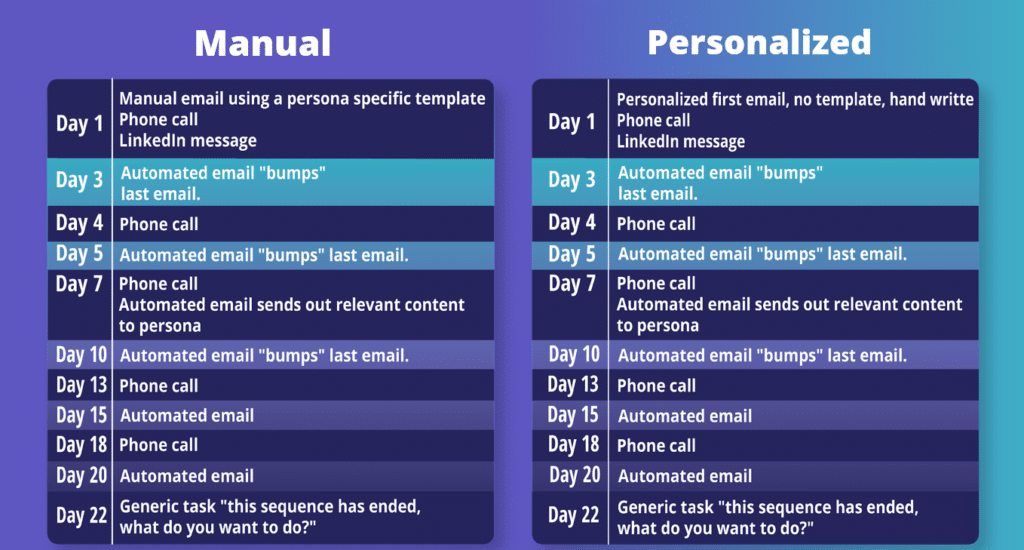
Here are two examples of great sequences from our friends at Outreach:
What’s the difference between these two?
If you read through, you would think these two sequences are exactly the same. And they almost are, with one BIG difference: the 1st email. The “manual” sequence includes a templated email (that may have a tiny bit of personalization). While the “personalized” sequence, on the other hand, includes a truly personalized email, like one written from scratch.
When do you use each type?
You will likely find yourself using the manual sequence for the majority of your top-of-funnel, prioritized prospecting, when refining your ‘hit list’, and cold leads. The return rate on automated emails is roughly 1%. So, we don’t want to spend too much time writing a truly personalized email for an unqualified account.
Now, when we’re talking about account penetration and account revitalization, we would recommend a personalized sequence instead. For these types of prospects, you will likely have solid background information or have had prior contact with the recipient. Warm leads will likely fall under this category as well, especially if you have spent time speaking with them at say a conference or networking event.
*Gasp* your sequence worked and they answered the phone! Now what?
Before starting your call series you should craft a couple of standard (but still great) intros for when your prospect actually answers. The key is to remember not to sell in the intro, instead focus on helping. The goal of your intro is to get your foot in the door and to get your prospect talking. Selling comes later.
Here’s what a great standard intro is going to include:
It should be short and focused on what’s in it for them (think SWIIFT℠)
Includes the goal of the call
Should end with a question
The entire goal of your intro is to GET THEM TALKING
The questions you ask in your intro should be short and shouldn’t require too much thinking. We want to aim for yes or no questions, or questions that involve an auto-answer. Think things like “How many reps are on your team?”, “Are you outbound or inbound?”, “Looking to add a couple of new team members?” Get them talking and THEN we transition to the sales call.
If you play your cards right, there will be plenty of time for selling either later in this first call, or during your follow-up (more tips on bridging to the follow-up call here). The first time your prospect answers the phone, your job is to get them talking and engaged. We’ve talked about what to do… now let’s touch on what NOT to do:
No social proof
No introducing yourself
No value props
No features or benefits
Remember: Don’t sell – do help!
Shoving research in their ear as soon as they answer isn’t appealing. The prospect doesn’t care if you’re the regional vice president for the mid-coast Atlantic region of your company’s XYZ division. In the first 2 minutes of the call, they don’t care what your amazing features are. What they care about is getting their job done better, faster, and easier. So, let’s start out by showing them how we can help!
Remember, the whole purpose of a sequence is to amplify your already amazing sales skills and get you to the finish line faster. So when working on your sales outreach, take time crafting your initial sequence cadence and your templated emails (if you’re going the manual sequence route). Future you will say “Thank you!”
If you’d like even more information on crafting the perfect prospecting message or sequence, you can watch our whole session with Brooke HERE!
Subscribe to our email list to receive new content, webinar invites, and training offers.
In the digital age, email remains a highly effective way to reach potential customers. However, crafting a compelling sales email can be challenging. That’s where ChatGPT comes in. As an OpenAI language model, ChatGPT can help you write effective sales emails that grab your audience’s attention and convert them into customers by using artificial intelligence. In this blog, we’ll show you how to use ChatGPT to write sales emails that get results.
***
I’m gonna be honest with you: I didn’t write that blog intro. Instead, I asked ChatGPT—a language model trained by OpenAI—to write it. (It’s a little formal, but not bad, eh?)
It’s hard to have a sales or marketing conversation without hearing about artificial intelligence, especially ChatGPT. It’s either the best thing since sliced bread or an evil supercomputer that’ll bring about the end of the world. Most people, I think, fall somewhere in the middle.
As a sales leader, should you be scared of ChatGPT? Or should you embrace this new technology and use it to make your sales teams better?
Although there are lots of potential use cases, in this blog I’ll focus on one: using ChatGPT to write sales emails.
A tale of two prompts: why you need to be specific when using ChatGPT to write sales emails
ChatGPT can churn out sales scripts and email templates faster than a human writer can. The question is: is it any good? And for sales reps specifically: will it get you more meetings and help you close more deals?
The answer: it totally depends!
In order for ChatGPT to work well, it all comes down to the quality of the prompt. If you have a detailed prompt that provides the AI with the right information, you’re good to go.
Compare the following examples:
***
Prompt: Write a sales email template for Factor 8.
Result:
Subject: [First Name], Boost Your Sales with Factor 8’s Sales Training Programs
Dear [First Name],
I hope this email finds you well. I wanted to introduce you to Factor 8, a leading sales training company that can help you increase your sales revenue and enhance your team’s performance.
At Factor 8, we understand that sales is a competitive and constantly evolving industry, and we’ve designed our programs to help your team stay ahead of the curve. Our training courses are tailored to meet your unique business needs and goals, and our experienced instructors will work with your team to develop the skills and techniques necessary to close more deals and exceed quotas.
Here are just a few of the benefits you can expect from our sales training programs:
Increased sales revenue: Our training programs are designed to help your team close more deals and exceed quotas, leading to higher sales revenue and improved profitability.
Improved team performance: By providing your team with the skills and techniques necessary to succeed in the competitive sales industry, our programs will help your team perform at their best.
Customized training solutions: We understand that each business has unique needs and goals, which is why we offer customized training solutions tailored to your specific needs.
Experienced instructors: Our instructors have years of experience in the sales industry, and they are committed to helping your team succeed.
To learn more about how Factor 8 can help you improve your sales performance, please visit our website or reply to this email to schedule a call with one of our sales representatives.
Thank you for your time, and I look forward to hearing from you soon.
Best regards,
[Your Name]
[Your Title]
[Your Company]
***
Okay, so it’s not terrible, but let’s be honest – there are a ton of problems with that email:
It’s wayyyyyy too long (yawn)
A lot of the copy seems canned
There’s no personalization within the email
Now, let’s see what happens when we’re more detailed in the prompt.
***
Prompt: Write a first-touch sales email template initiating contact between a Business Development Rep at Factor 8 and a mid-level Sales Manager at Meta. Structure according to the AIDA framework: Attention, Interest, Desire, Action. Make sure there’s at least one question in the body of the email. Be sure to reference our key value proposition: Factor 8 rep & manager training drives topline growth. The call-to-action for the email is to set up a 15-minute introductory call. Limit output to 125 words or less.
Result:
Subject: Increase Your Sales Revenue with Factor 8’s Manager Training
Hi [First Name],
As a Sales Manager at Meta, you know how important it is to have a well-trained team. That’s why I wanted to introduce you to Factor 8’s training programs. Our training is tailored to meet your unique business needs and goals. Our experienced advisors will equip you with the skills necessary to improve your team’s performance and drive topline growth.
Are you available for a quick 15-minute call this week? Let’s discuss how we can help you achieve your sales targets.
Best regards,
[Your Name]
Business Development Rep, Factor 8
P.S. You can learn more about our training program on our website.
***
I wouldn’t call that a perfect sales email – but it’s definitely headed in the right direction. Most sales reps could probably use that copy as a starting point, then edit and personalize to be more engaging for their target prospect.
Tip: Want to sound less formal? Just add that you want a more casual tone to the prompt.
Understand the intent behind your copy. ChatGPT isn’t a mind reader. It doesn’t know why you want to generate copy or your intended result. So just like in the example above, you need to be specific. (Which means you need to have it figured out before you sit down with the AI. It’s a robot, but don’t waste both of your time!)
Gather necessary information in advance. Before you begin the AI writing process, gather all the information you need to create your copy. ChatGPT can pull in some information, but others you’re going to need to specify or add in later.
Be as detailed as possible in the prompt. The more information you provide ChatGPT, the better and more relevant it will be. Always add the tone of your messaging into the prompt.
Fine-tune your copy. You’ll probably noticed that even with a detailed prompt, ChatGPT wasn’t able to create an engaging sales email. There’s still a gap between AI capabilities and copy that’s engaging to a human reader. Your reps (and maybe even internal your copywriters) will need to bridge that gap. Use ChatGPT as a starting point, and then refine!
Test and optimize. Like any good sales asset, once your copy is finalized, it’s important to test it to see how it performs. Create different versions and take them for a spin! You only know if you try.
In the end, is ChatGPT worth it for your sales team? The answer is: it still depends. If it helps jumpstart your creative process to help you generate email templates faster, then it could be great!
But if your reps want to use it as a shortcut instead of doing the hard work to understand the client, gather information, and compile the best ways to engage them – then keeping it all human might be the better way to go.
Subscribe to our email list to receive new content, webinar invites, and training offers.